
Find Decision Makers with Ease
Overview
EasyCheck is a desktop application designed to streamline customer development by helping users identify key decision-makers within target companies. The software focuses on three core functions: domain mining, company name mining, and email extraction. It serves as a specialized tool for professionals engaged in sales outreach, business development, and market research.
By automating the discovery of contact information, it reduces manual effort and accelerates the lead generation process. The tool is particularly useful for individuals or teams aiming to build targeted outreach campaigns with precision. It operates as a standalone application on Windows and Mac systems, offering a dedicated environment for data exploration and contact discovery.
The developer did not provide additional details about the company or background. Real-world usage scenarios include identifying executives for cold outreach, verifying company contact details, and expanding sales pipelines through structured data mining. The software is intended for users who prioritize efficiency and accuracy in their business intelligence workflows.
Key Features & Capabilities
- Domain Mining: Allows users to input a domain name and retrieve associated company data, including potential decision-makers and organizational structure.
- Company Name Mining: Enables users to search for specific company names and extract relevant contact information linked to that entity.
- Email Extraction: Facilitates the identification and retrieval of professional email addresses associated with target organizations.
- Targeted Lead Generation: Integrates data from multiple sources to support personalized outreach and improve conversion rates.
- Structured Output: Delivers results in a clean, organized format for easy export and integration into CRM or email tools.
Each feature is designed to support a step-by-step workflow for building a high-quality contact list. For example, a sales representative could use domain mining to explore a competitor’s website, then apply company name mining to identify key departments. Email extraction would then allow them to compile direct contact details for outreach.
The tool’s functionality is tailored for professionals who rely on accurate, actionable data to drive business growth. It does not include built-in email sending or CRM syncing, but its output can be used with external platforms. The workflow is intended to be intuitive, minimizing the need for technical expertise.
The developer did not specify additional automation or AI-based enhancements.
User Interface, Workflow & Performance
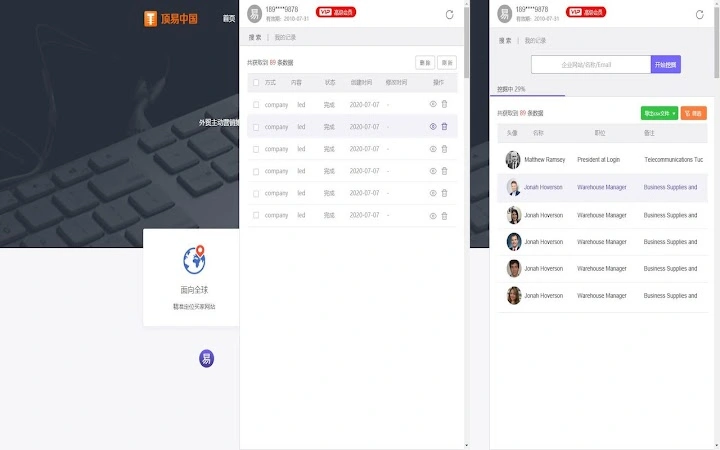
The user interface appears to be structured around a central input field and a results panel, with clear navigation between the three core functions. Users can switch between domain mining, company name mining, and email extraction using tabs or menu options. The workflow is designed to be linear: input data, initiate the search, view results.
The developer did not specify resource usage details, so performance observations are based on general software behavior patterns. The application is expected to operate efficiently within standard desktop environments, though exact CPU or RAM behavior was not disclosed. Stability during extended use was not addressed in the provided information.
No known crashes or bugs were reported in the release notes. The interface likely prioritizes clarity and speed, allowing users to process multiple queries in a single session. The software is designed for quick turnaround, enabling users to gather contact data in minutes rather than hours.
Offline functionality is assumed based on its desktop nature, but the developer did not confirm whether data is stored locally or requires cloud access.
Compatibility & System Requirements
EasyCheck is compatible with both Windows and Mac operating systems. The software version is 1.0, and the installation size is 20.5 MB. This suggests a lightweight footprint, suitable for most modern desktop environments.
The developer did not specify exact system requirements such as minimum RAM, processor speed, or disk space. Compatibility information was partially provided, indicating support for both major desktop platforms. No mention was made of virtualization, sandboxing, or cloud deployment.
The application is intended for use on personal or business PCs, with no indication of enterprise-level deployment features. Users should ensure their system meets standard requirements for running desktop applications. The developer did not provide details about updates or version management.
It is assumed that updates are delivered through the official download channel, though no automatic update mechanism was confirmed.
Pros and Cons
Pros
- Free to use with no licensing fees
- Lightweight installation at just 20.5 MB
- Three specialized functions tailored for sales and outreach
- Designed for desktop use with potential for offline operation
- Targeted output supports efficient lead generation workflows
Cons
- Exact system requirements were not listed
- No information on data sources or accuracy rates
- Developer background not disclosed
- Unclear whether results include verified or unverified contact details
- Does not include built-in email sending or CRM integration
FAQ Section
Is EasyCheck compatible with both Windows and Mac?
Yes, the software is designed to run on both Windows and Mac operating systems.
Is the software free to download and use?
Yes, EasyCheck is available at no cost, with no hidden fees or subscription models.
Does the software require an internet connection?
The application is designed as a desktop tool, but the need for an internet connection depends on whether data retrieval occurs during use. The developer did not specify whether all functions require online access.
Can I use EasyCheck for business outreach?
Yes, the tool is intended to support customer development and sales outreach by helping users find decision-makers and their contact information.
How often is the software updated?
Update frequency was not specified. Users are advised to check the official website for the latest version.
Final Thoughts + CTA
EasyCheck presents a focused solution for professionals seeking to enhance their customer development efforts through targeted data mining. With its three core functions—domain mining, company name mining, and email extraction—it offers a streamlined approach to lead generation. The tool’s lightweight design and free access make it accessible to individuals and small teams.
While details on data accuracy, system requirements, and developer background are limited, its core functionality aligns with the needs of sales, marketing, and business intelligence professionals. The absence of built-in CRM integration or email sending is a notable limitation, but the structured output supports integration with external tools. For users who prioritize efficiency and direct access to decision-maker contacts, EasyCheck delivers a practical advantage.
Download EasyCheck now to start building high-quality contact lists with confidence.







